
This document introduces the use and safety precautions of Gigaset A140/Gigaset A240 phone.
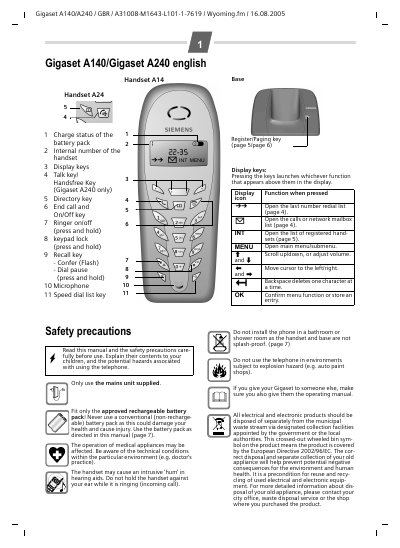
This manual guides you through installing the base unit, fitting the rechargeable battery pack, and registering the handset. It covers safety precautions, keypad lock activation, making and receiving calls, using the directory and speed‑dial lists, and internal call features such as conference and barge‑in.
Additional sections describe base‑station settings, power specifications, dimensions, and warranty information, plus contact details for Siemens customer support and service centres.
| Power consumption (ready) | approx. 2 Watt |
|---|---|
| Power consumption (charging) | approx. 3 Watt |
| Power consumption (call) | approx. 2 Watt |
| Battery pack capacity | 550 mAh |
| Charging time (base) | approx. 10 hours |
| Calling time | approx. 10 hours |
| Standby time | approx. 170 hours (7 days) |
| Handset dimensions | 154 × 59 × 29 mm (L × W × H) |
| Base dimensions | 87 × 129 × 89 mm (L × W × H) |
| Handset weight | approx. 127 g |
| Base weight | approx. 121 g |
Charging the battery pack in the base takes about 10 hours.
In ready (idle) status the phone consumes approximately 2 Watt.
Up to four handsets can be registered to a single base station.
Press and hold the hash key (#) to activate the keypad lock; the display shows the lock icon.