
The Casio TE-M80 is a compact entry-level cash register with a high-speed thermal printer and a range of useful features that make it ideal for the small business retail environment.
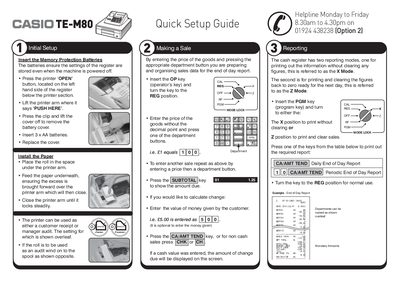
This manual explains how to set up the Casio TE-M80 cash register, including installing the memory‑protection batteries, loading paper, and configuring basic settings. It also covers the two reporting modes (X and Z) and how to generate end‑of‑day reports.
Detailed sections describe programming the company logo, department names and prices, setting the date and time, and handling common errors such as receipt‑printing problems. Instructions for spool and receipt printing, as well as battery replacement, are included.
| Memory protection battery type | 3 × AA |
|---|---|
| Receipt header capacity | 5 lines, 24 characters per line |
| Number of department keys | 15 |
| Paper type | 57 mm thermal paper |
Open the printer arm, lift the battery cover, insert three AA batteries, and replace the cover.
Insert the PGM key, turn to PGM mode, press 2, select the line number, type the text, press CA/AMT TEND to save, then press SUB TOTAL to finalize.
Insert the PGM key, turn to PGM, press 1 then SUBTOTAL, enter the date as YYMMDD, press X/DATE TIME, then press AC C to finalize; for time press 7 then SUBTOTAL, enter HHMM, press X/DATE TIME, and finalize.
Use 57 mm thermal paper for the receipt printer.