
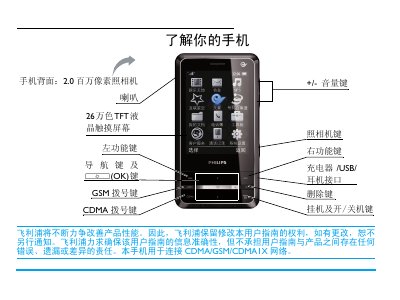
This manual guides users through the first‑time setup of the Philips C700 phone, including inserting UIM/SIM cards, charging the battery, and configuring network settings. Detailed sections cover making and receiving calls, sending messages, using the camera, and accessing multimedia functions.
Additional chapters explain system settings such as screen calibration, stylus use, shortcut keys, power‑saving mode, and troubleshooting common issues. The document also includes warranty information and environmental compliance details. This manual is written in Chinese.
| Camera resolution | 2.0 MP |
|---|---|
| Screen colors | 260,000 colors |
| Network compatibility | CDMA, GSM, CDMA1X |
| SIM slots | 2 (UIM and SIM) |
| SAR (max) | 0.275 W/kg |
Press and hold the power key to turn the phone on or off.
Enter System Settings > Screen Calibration and follow the on‑screen instructions.
Press A to enter the network selection screen, choose the desired network, and confirm.
In standby, the phone automatically enters power‑saving mode after a set time; any key press wakes the screen.