
This document is the instruction manual for H380 watch, which introduces the basic operating methods of the watch, such as zero position check, base position adjustment and time adjustment.
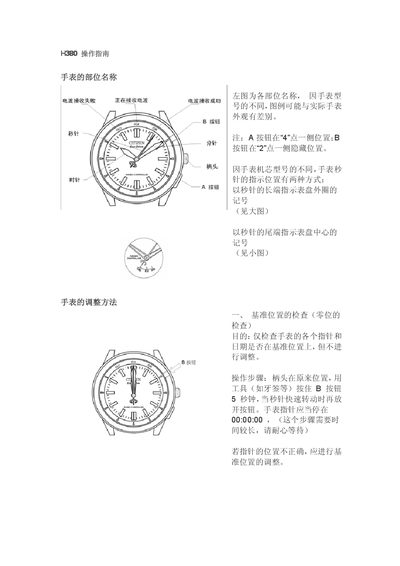
The manual describes the names and locations of the watch's components, noting that visual differences may exist between models. It explains how to use the A and B buttons and how the second hand can indicate positions either by its tip or tail.
It provides step‑by‑step procedures for checking the baseline position, resetting the watch to zero, and adjusting the time, including detailed actions for the crown and button presses. This manual is written in Chinese.
Press and hold the B button with a tool for about 5 seconds; when the second hand spins quickly, release the button and the hands should stop at 00:00:00.
Hold the B button for more than 5 seconds, pull the crown out one click, turn the crown until the second, minute, and hour hands align at 12 o’clock, then push the crown back and press B once.
Pull the crown out one click, turn it forward until the second hand makes a click sound and moves a full rotation, then continue turning until the desired time is set, and finally push the crown back.