
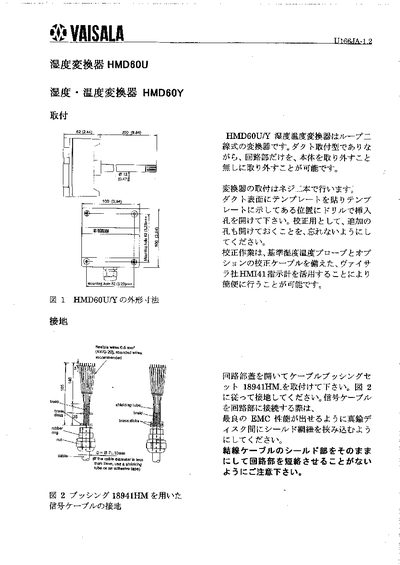
The HMD60U/Y humidity‑temperature converter is a loop‑type sensor that can be mounted on ductwork without removing the circuit board. Installation is done by attaching a template to the duct surface, drilling the indicated holes and securing the unit with screws. The signal cable connects to a 5‑pin screw‑type terminal and must be grounded using the provided brass bushing.
Calibration is performed with a Vaisala HIMT41 instrument and the optional calibration cable. The manual also describes sensor‑head removal and replacement, spare‑part numbers, and provides technical data such as measurement range, supply voltage, and operating temperature limits. This manual is written in Japanese.
| Measurement range | 0–100 %RH |
|---|---|
| Supply voltage | 10–35 VDC |
| Output signal | 4–20 mA |
| Circuit temperature range | -5 °C to +55 °C |
| Sensor head temperature range | -40 °C to +80 °C |
Mount the converter using screws after applying a template to the duct surface and drilling the indicated holes.
Use a Vaisala HIMT41 instrument together with the optional calibration cable to perform the calibration.
The unit operates from a DC supply of 10 to 35 V.
Attach the brass bushing (part 18941HM) to the cable and connect it to the grounding point as shown in the diagram.