
This is a cell phone manual, which introduces how to turn on and off the phone, make calls, receive calls, save and view phonebooks, etc.
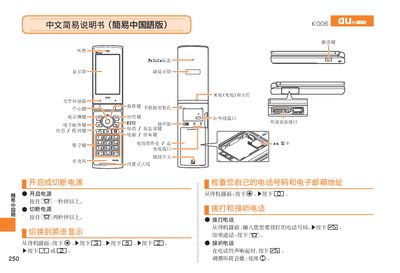
This manual provides step‑by‑step instructions for operating the au K008 mobile phone. It explains how to power the device on and off, adjust volume, use the mute key, and navigate the display and keypad.
The guide also covers making and receiving calls, managing contact lists, setting up international dialing, using voice memos, and contacting au customer service for support. This manual is written in Chinese.
From the standby screen, press and hold the mute key for more than one second.
Repeat the same step of pressing and holding the mute key for more than one second.
Enter the country code, area code, and the phone number, e.g., for a US long‑distance call, dial 212‑123‑xxxx.