
This document describes the various features and characteristics of a mobile phone, including microSD card slot, infrared port, microphone, power/end key, etc.
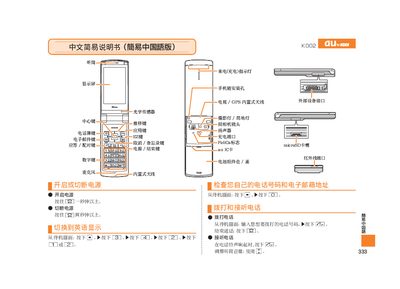
The guide explains basic phone operation, including powering on the device, dialing numbers, answering and ending calls, adjusting volume, and using mute mode. It also details how to manage contacts, make international calls, and use the voice memo feature.
Additional sections cover the built‑in camera functions, such as taking photos, recording videos, switching between photo and animation modes, and saving media. The manual provides step‑by‑step instructions for each feature using the phone's keypad shortcuts. This manual is written in Chinese.
Press and hold the power button for more than one second.
When the phone rings, press the call button.
From the standby screen, press and hold the photo button for a second, then press the shoot button.