
This is a mobile phone user manual, which details the phone's power on/off, language switching, dialing and answering calls, saving and viewing phone book entries, using the camera (animations and snapshots), dialing international long-distance calls, setting silent mode and setting voice memos (voice recordings) and other features.
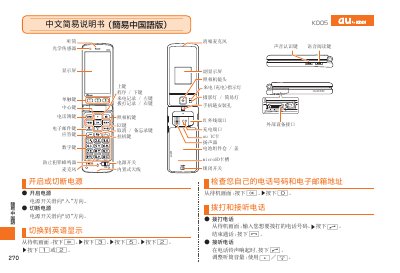
This manual explains how to use the au K005 camera. It covers basic power‑on procedures, navigation of the on‑screen menus, and the functions of each button.
Key operations such as taking snapshots, recording video, toggling mute mode, and saving images are described with the corresponding button sequences. The guide also includes phone‑dialing shortcuts and troubleshooting tips. This manual is written in Chinese.
Press the capture button (拍撮快照) to take a photo.
In photo mode, press the video button to switch to video mode.
Press the mute‑cancel button to exit mute mode.
After taking a photo, press the save button to store the image.