
This document is the user manual of bone conduction wireless earphones
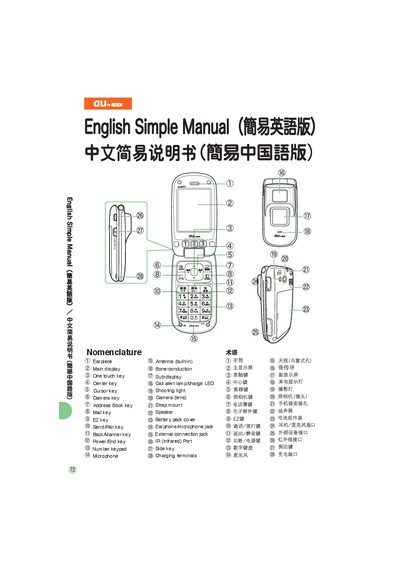
This manual provides step‑by‑step instructions for basic functions of an au phone, including power control, making and receiving calls, managing contacts, and using email, camera, and bone‑conduction speaker features. It includes both English and Chinese instructions with illustrated key layouts.
Additional sections cover international dialing, mute mode, voice message playback, and contact information for au customer service. The guide is designed for everyday users to quickly learn how to operate the device.
| Antenna | built‑in |
|---|---|
| Battery pack cover | present |
| Charging terminals | present |
Press and hold the power key for more than one second.
From the standby screen, enter the phone number and press the call key.
When a call arrives, long‑press the side key to close the phone, then place the bone‑conduction speaker near your ear.