
This PDF file is the user manual of BDL5530EL LCD display. It introduces the functions, features and installation methods of the display.
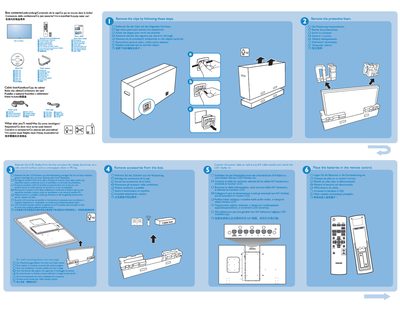
The guide lists the items included in the BDL5530EL package and describes the rear connectors that link the device to a PC or wall outlet. It also provides multilingual labels for the connectors and basic wiring information.
Installation instructions focus on wall mounting the unit. Six 10 mm screws are required (not supplied) and the guide shows portrait and landscape mounting options. A brief quick‑start section explains how to connect the device and begin operation.
| Wall‑mount screws | 6 × 10 mm (not included) |
|---|
The box contains the BDL5530EL unit, a cable box, and the required mounting hardware (screws are not included).
Six 10 mm screws are required for wall mounting; they are not supplied with the product.