
This manual describes how to install a car stereo, including connecting power, speaker and ground wires, as well as turning on the unit, setting the date and time, etc.
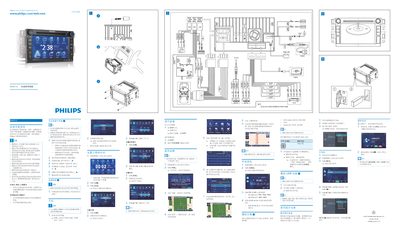
This guide explains how to safely install the Philips CID3288 on a grounded 12 V power source using only the supplied hardware. It includes safety precautions such as avoiding short circuits and ensuring all connections share a common ground.
The manual also describes the operating controls, OSD settings, clock modes, and supported media formats. Connectivity options such as SDHC, Bluetooth, AUX inputs, and USB playback are covered, along with region and GPS settings for navigation. This manual is written in Chinese.
| Power Supply | 12 V DC |
|---|---|
| Supported Media Formats | DVD video, DVD‑R, DVD‑R W, VCD, Audio CD, CD‑R, CD‑R W |
Install the device on a grounded 12 V supply using only the supplied installation hardware.
It can play DVD video, DVD‑R, DVD‑R W, VCD, Audio CD, CD‑R, and CD‑R W.