
This document explains how to properly set up a speaker system for optimal sound quality and provides steps for connecting and setting up a home theater system.
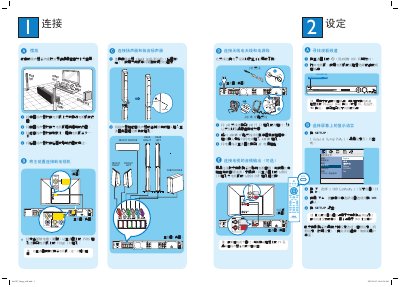
This guide explains how to place the speakers for optimal sound, connect the main unit to the TV via composite video, attach the FM/AM antenna, and power the system. It also covers audio input options such as AUDIO IN, USB playback, and MP3 LINE‑IN connections.
The manual details DVD playback steps, remote‑control functions for surround sound, language selection, and how to use the quick‑start features for USB and other portable audio sources. This manual is written in Chinese.
| Speaker configuration | 1 center, 2 front, 2 rear, 1 subwoofer |
|---|---|
| FM antenna impedance | 75 Ω |
Use the composite video cable to connect the main unit's CVBS socket to the TV's VIDEO IN socket.