
This document is a concise user guide for the PHILIPS DVD RECORDER, which provides installation and setup instructions for the DVD recorder, as well as methods for connecting the DVD recorder to a TV. It also explains the steps for recording and playback.
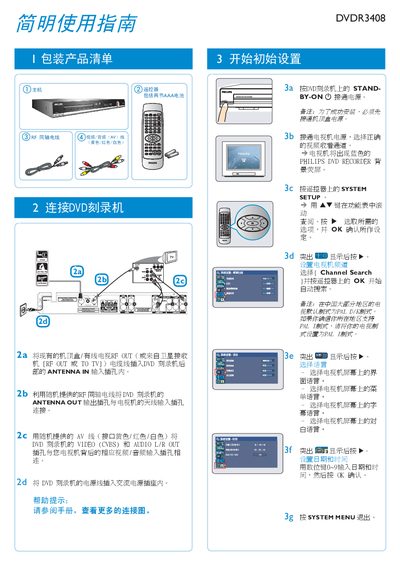
This manual explains how to install and configure the Philips DVDR3408 DVD recorder. It covers connecting the AV cables, setting the system menu, and selecting the appropriate recording source. Instructions are provided for inserting supported discs (DVD+R, DVD+RW, DVD+R DL) and configuring recording modes.
The guide also details operation procedures such as starting, pausing, and stopping a recording, as well as playing back recorded media. Remote‑control functions, channel searching, and troubleshooting tips are included to help users get the most out of the device. This manual is written in Japanese.
| Supported disc formats | DVD+R, DVD+RW, DVD+R DL |
|---|---|
| Maximum recording time | Up to 6 hours (VHS Super Long Play) |
Insert a supported DVD, select the REC source, and press the REC button.
Press the MM button while recording to pause.
Press the STOP button to end the recording.