
Epson C9100 Color Laser Printer Jam Troubleshooting Guide

Color Laser Printer Jam Troubleshooting Guide
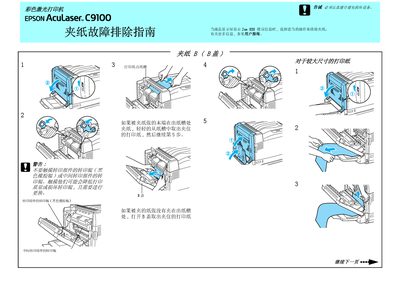

Epson C9100 Color Laser Printer Jam Troubleshooting Guide - cover page
Brand
Epson
Category
Printer
Document type
User Manual
Language
Chinese
Pages
4
File format
PDF
File size
356 KB
Published
21 March, 2012
Updated
01 October, 2023
Model
C9100
MD5 checksum
9FC9339446B6782F9AE95C4F5B21DE38

About this manual

This four-page guide provides illustrated jam-clearing procedures for the Epson C9100 color laser printer. It addresses Jam XXX messages shown on the LCD display and directs users to the appropriate steps for each jam location.

Procedures cover jams at the B and E covers, the standard bottom paper cassette, optional 500-sheet and 1500-sheet A3 bottom feed cassettes, and the optional duplex printing unit. Warnings advise against touching the transfer rollers because doing so may reduce print quality or damage the rollers. This manual is written in Chinese.

What's inside

  • Jam B (B cover)
  • Jam E (E cover)
  • Jam B, C1 (B cover and standard bottom paper cassette)
  • Jam E, C2/E, C3/E, C4 (E cover and optional paper cassettes)
  • Jam B, D (B cover and optional duplex printing unit)
  • Optional 500-sheet A3 bottom feed cassette
  • Optional 1500-sheet A3 bottom feed cassette

Frequently asked questions

What should I do when the Epson C9100 LCD displays a Jam XXX error?

Select the appropriate operation in the guide to clear the jam for the indicated location. The guide also refers readers to the user guide for more information.

Which optional paper feed units are covered by the Epson C9100 jam guide?

The guide covers the optional 500-sheet A3 bottom feed cassette and the optional 1500-sheet A3 bottom feed cassette.

Why should I avoid touching the transfer rollers during jam removal?

Touching the transfer rollers may reduce print quality or damage them, requiring replacement.

Download PDF (356 KB)

More Epson Manuals


View all Epson manuals →