
This is the instruction manual of Infinova CCTV lens, which introduces the lens interface, installation, wiring, aperture and other contents
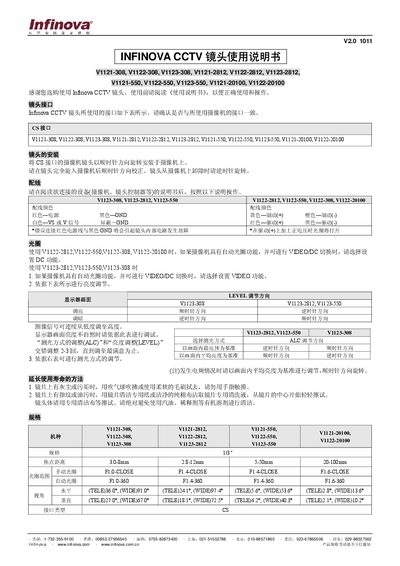
This manual covers the Infinova CCTV lenses that use a CS interface and are offered in several focal length ranges (3‑8 mm, 2.8‑12 mm, 5‑50 mm, 20‑100 mm). It explains how to install the lens on a camera, connect power and control wires, and set aperture and brightness settings.
Key sections include lens interface details, step‑by‑step installation, wiring colour codes, aperture selection (VIDEO or DC mode), brightness/ALC adjustment, maintenance tips, and comprehensive safety warnings. This manual is written in Chinese.
| 焦点距离 | 3.0‑8 mm / 2.8‑12 mm / 5‑50 mm / 20‑100 mm |
|---|---|
| 手动光圈 | F1.0‑CLOSE / F1.4‑CLOSE / F1.6‑CLOSE |
| 自动光圈范围 | F1.0‑360 / F1.4‑360 / F1.6‑360 |
| 水平视角 | TELE 36.0°, WIDE 91.0° |
| 垂直视角 | TELE 27.0°, WIDE 67.0° |
| 接口类型 | CS |
| 电源电压 | DC8.5‑16 V |
| 驱动阻抗 | 190 Ω±10% (20℃) |
| 制动阻抗 | 720 Ω±10% (20℃) |
Rotate the CS‑interface lens clockwise onto the camera, fully screw it in, then fine‑adjust clockwise; to remove, rotate counter‑clockwise.
Red – power, Black – GND, White – VS or V signal, Shield – GND; Yellow – brake (+), Orange – brake (‑), Red – drive (+), Black – drive (‑).