
This document is the user guide of Philips mobile phone, which introduces the basic functions and usage methods of the phone.
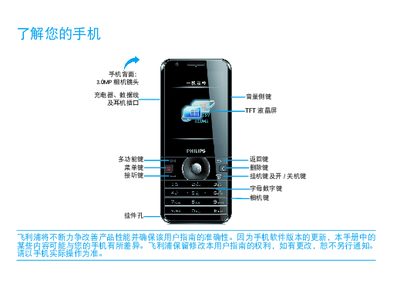
This manual explains the functions of the Philips wz715 mobile phone, covering key buttons, main menu navigation, and built‑in applications such as the camera, music player, and web browser. It also details how to install a SIM card, use Micro‑SD storage, and manage contacts and messages.
Additional sections provide safety guidelines, battery‑saving tips, network connection information (GSM, 3G, GPRS, EDGE, WCDMA, HSDPA), and troubleshooting steps for common issues like no network signal, charging problems, and device not powering on. This manual is written in Chinese.
| Camera resolution | 3.0 MP |
|---|---|
| Storage expansion | Micro SD card |
Turn off the phone, remove the battery cover, and then insert the SIM card before closing the cover and powering the device back on.
Remove the battery, reinstall it, and charge the phone until the battery indicator stops flashing before attempting to power it on again.