
This document is the installation guide for the D-Link DWL-3500AP/8500AP wireless switch AP, which introduces the product's system requirements, features, packaging contents, hardware installation and other contents
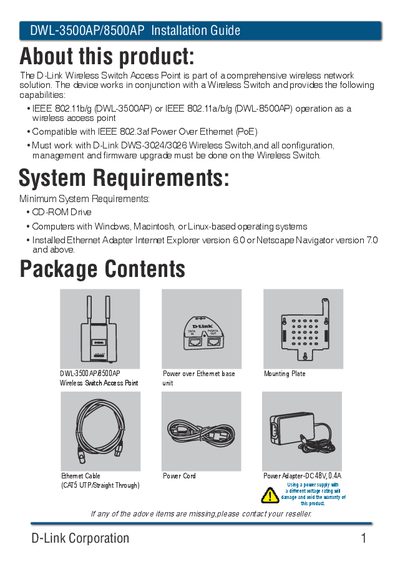
This guide explains how to install D-Link DWL-3500AP and DWL-8500AP wireless access points. It includes hardware mounting, connecting Ethernet and power cables, and the three power options (PoE switch, PoE Base Unit, or external power adapter). The document also describes how to activate the AP through the D-Link wireless switch web GUI and perform basic configuration.
Additional sections provide package contents, technical support contact information for the United States, Canada, United Kingdom, and Ireland, and regulatory statements for FCC and Industry Canada compliance.
| Wireless standards | 802.11b/g (DWL-3500AP) / 802.11a/b/g (DWL-8500AP) |
|---|---|
| PoE compliance | IEEE 802.3af |
| Power adapter voltage/current | 48 V DC, 0.44 A |
| Antenna gain | 2 dBi (maximum) |
| Antenna impedance | 50 Ω |
After connecting Ethernet and power, log into the D-Link wireless switch web GUI and follow the "Basic Setup" steps to discover and activate the AP.