
This quick installation guide shows you how to connect your DVD system and TV, and how to play DVDs.
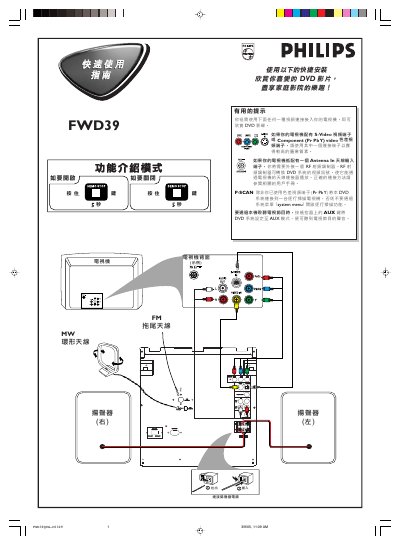
This manual introduces the Philips FWD39QUG-C0309 DVD player, describing its video output options such as S‑Video, Component (Pr Pb Y) and composite video, and explains how to connect the unit to a TV, including the use of an external RF modulator when only an antenna input is available. It also notes the P‑SCAN function and AUX mode for listening to TV audio.
The quick‑start section walks the user through the Plug & Play installation: press PLAY to start auto‑install, insert a disc (region‑coded ALL or 3), select video input on the TV, and use the remote control for playback, stop, and menu navigation. Included accessories such as audio and video cables, MW and FM antennas, and an AA battery are listed for reference. This manual is written in Chinese.
| Supported Region Codes | ALL, 3 |
|---|---|
| Included Accessories | Audio cable, Component video cable, MW antenna, Composite video cable, AA battery, AC power cord, FM antenna |
Press PLAY on the main unit to begin auto‑install, then insert a disc and the player will start automatically.
Use an S‑Video or Component (Pr Pb Y) video connector for higher image quality.
Discs marked with the ALL region code or region code 3 are supported.
The package contains audio and component video cables, an MW antenna, a composite video cable, an AA battery, an AC power cord, and an FM antenna.