
Philips SHB1400 Bluetooth stereo headset user guide, including headset pairing, power on/off, volume adjustment, answering calls, rejecting calls, etc.
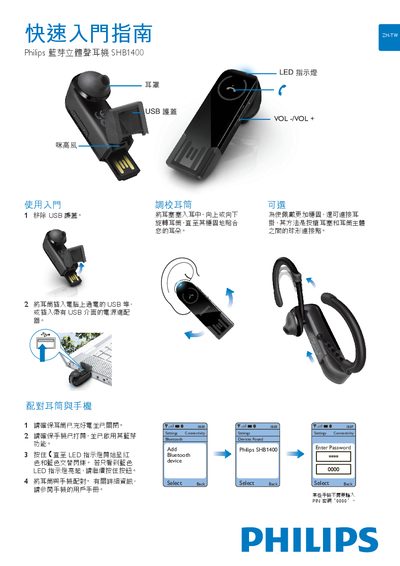
The SHB1400 is a Bluetooth stereo earphone with LED indicators and volume buttons. This guide explains how to charge, pair, and use the earphones with a mobile phone or computer.
Key functions include power on/off, volume adjustment, call handling, and battery status indication via LED colors. Follow the step‑by‑step instructions to ensure a stable connection and optimal audio experience. This manual is written in Chinese.
| Charging method | USB |
|---|---|
| Low battery indicator | steady red LED |
| Volume control buttons | VOL+ and VOL- |
Press and hold the power button (or simultaneously press VOL+ and VOL-) until the LED turns on or off.
When the battery is low, the LED shows a steady red light.