
This quick start guide introduces how to connect the DVD recorder, how to perform initial settings, and how to start manual recording and playback.
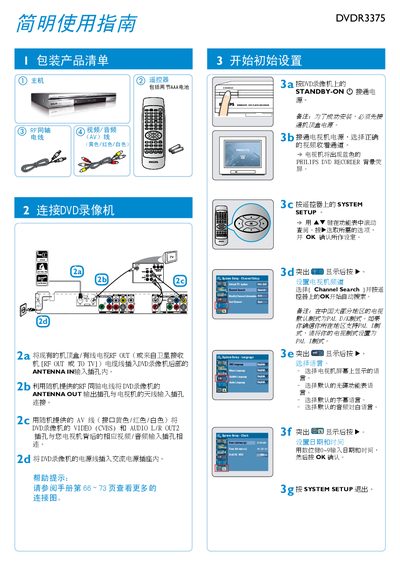
This guide explains how to unpack the Philips DVDR3375 DVD recorder, connect it to a TV and antenna, and configure basic system settings such as channel search, language, date and time. Detailed wiring instructions cover the RF cable, AV cable and power connection.
The manual also describes how to record TV programs or external video sources, choose recording modes, and operate playback functions. It includes tips for disc handling, supported disc formats, and audio/video output options. This manual is written in Chinese.
| Supported disc formats | DVD±R/±RW |
|---|---|
| Recording modes and maximum duration | 1 h, 2 h, 4 h, 6 h |
| Video input options | Front CVBS, Rear CVBS, Rear S‑Video, DV, YUV |
Enter System Setup, select the Language menu, and choose the desired display, subtitle, and audio language.
Press REC SOURCE to select the source (e.g., Tuner), choose REC MODE, then press REC to begin recording.