
This document is a user manual for DVP 3026K DVD player, including instructions on audio and video connections, as well as remote control usage.
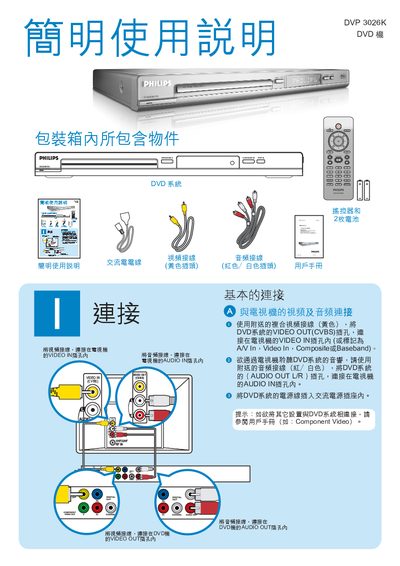
This manual describes the DVD player's connections, including Component Video, CVBS video inputs, and left/right audio outputs. It also lists the remote‑control functions such as PLAY/PAUSE, DISC MENU, and SETUP.
The guide explains how to navigate the on‑screen display, change the OSD language, lock the disc, and use power‑saving features like Sleep mode. Additional details on general setup and language selection are provided. This manual is written in Chinese.
| Audio Output | L/R |
|---|
Press the PLAY/PAUSE button on the remote control.
Enter the General Setup page and select the desired OSD Language, such as English.
Use the Disc Lock function from the remote control menu.