
This is a Samsung ML-1641/1640// ML2240/2241 counter installation manual, which introduces the method of replacing the counter chip.
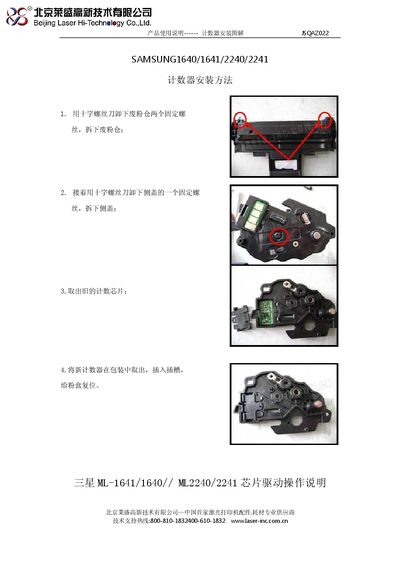
The document explains how to install and use the chip drive for Samsung monochrome laser printers of the ML‑1640, ML‑1641, ML‑2240 and ML‑2241 series. It includes safety precautions, compatibility notes, and detailed installation steps.
Key sections cover the removal of the old chip, placement of the new chip, printer warm‑up procedures, and driver installation. The guide also lists supported operating systems and hardware specifications for proper operation. This manual is written in Chinese.
| Print speed | Up to 17 ppm (Letter) |
|---|---|
| Resolution | 1200 x 600 dpi |
| Processor | 150 MHz |
| USB interface | Full‑speed USB |
| SPL version | 5.07 |
| Engine version | 1.00.50 |
| Supported OS (Windows) | 2000/XP/2003 Server/Vista |
| Supported OS (Linux) | Red Hat 8‑9, Fedora Core 1‑4, etc. |
| Supported OS (Mac) | Mac OS 10.3‑10.5 |
The chip drive works with Windows 2000, XP, 2003 Server and Vista, various Linux distributions such as Red Hat 8‑9 and Fedora Core, and Mac OS 10.3‑10.5.
First remove the old chip using a Phillips screwdriver, then place the new chip into the slot, ensure it is seated correctly, and re‑secure the fixing screw before powering the printer.