
Quick Installation Manual, instructions on how to connect a PSP to a TP-Link wireless broadband router, including connection steps and usage instructions.
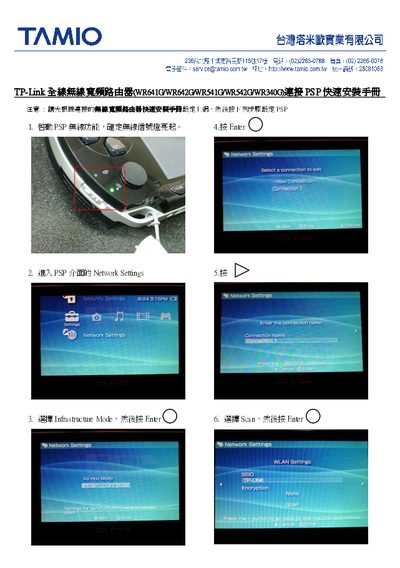
This guide provides step‑by‑step instructions for configuring the PSP wireless function on TP‑Link routers. It starts with confirming that the PSP wireless indicator is lit, then walks you through the Network Settings menu.
Next, you select the appropriate connection mode, scan for available networks, and enter the connection name. After completing the WLAN settings, the guide confirms successful connection and testing of the wireless link. This manual is written in Chinese.
Make sure the PSP wireless indicator is lit before proceeding.
In Network Settings, choose the desired connection mode and then confirm the selection.