
TEC B-472 industrial high-speed barcode printer, 76.2-254mm/s printing speed suitable for mass printing requirements of production enterprises, floating head and save ribbon module can effectively save the wear of ribbon, strong steel structure can guarantee long-term stable operation.
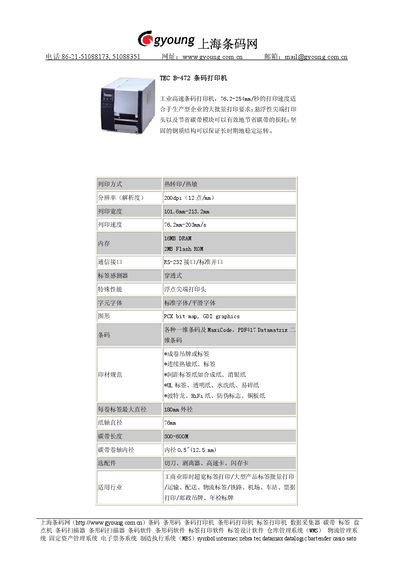
The TEC B-472 is an industrial high‑speed barcode printer offering a printing speed of 76.2‑254 mm/s, 200 dpi resolution, and a floating‑point print head that reduces ribbon waste. Its steel construction ensures stable long‑term operation, and it supports both thermal transfer and direct thermal printing.
The printer handles a wide range of media including continuous thermal paper, label rolls, synthetic and coated papers, and specialty substrates such as UL‑rated and anti‑counterfeit labels. It provides RS‑232 and standard parallel interfaces, 16 MB DRAM, 2 MB Flash ROM, and optional accessories like cutters, peelers, and high‑speed cards. This manual is written in Chinese.
| Print Speed | 76.2‑254 mm/s |
|---|---|
| Resolution | 200 dpi (12 dots/mm) |
| Print Width | 101.6‑213.2 mm |
| DRAM | 16 MB |
| Flash ROM | 2 MB |
| Interface | RS‑232 and standard parallel port |
| Power Consumption | 300‑600 W |
| Maximum Label Roll Diameter | 180 mm |
| Core Diameter | 0.5 in (12.5 mm) |
The printer provides an RS‑232 serial interface and a standard parallel port.
The printer can print at speeds from 76.2 mm/s up to 254 mm/s.