
Key facts
Start here
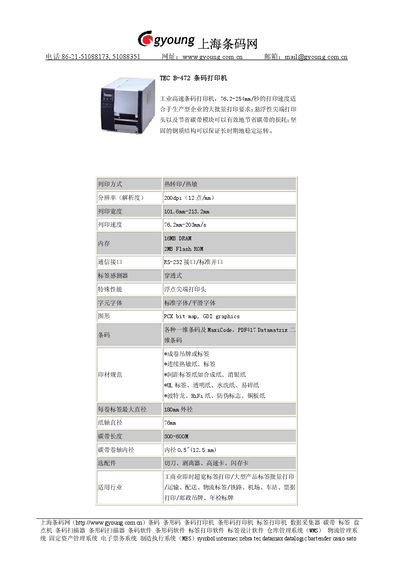
TEC B-472 Barcode Printer User Manual
The TEC B-472 is an industrial high‑speed barcode printer offering a printing speed of 76.2‑254 mm/s, 200 dpi resolution, and a floating‑point print head that reduces ribbon waste. Its steel construction ensures stable long‑term operation, and it supports both thermal transfer and direct thermal printing.
The printer handles a wide range of media including continuous thermal paper, label rolls, synthetic and coated papers, and specialty substrates such as UL‑rated and anti‑counterfeit labels. It provides RS‑232 and standard parallel interfaces, 16 MB DRAM, 2 MB Flash ROM, and optional accessories like cutters, peelers, and high‑speed cards. This manual is written in Chinese.
TEC B-472 specifications
| Print Speed | 76.2‑254 mm/s |
|---|---|
| Resolution | 200 dpi (12 dots/mm) |
| Print Width | 101.6‑213.2 mm |
| DRAM | 16 MB |
| Flash ROM | 2 MB |
| Interface | RS‑232 and standard parallel port |
| Power Consumption | 300‑600 W |
| Maximum Label Roll Diameter | 180 mm |
| Core Diameter | 0.5 in (12.5 mm) |
All TEC B-472 documents by type
Day-to-day operation, settings and troubleshooting. Start here if the product is already set up.
Disassembly, diagnostics and part numbers, for repair.
Questions answered in these manuals
What interfaces are available on the TEC B-472 printer?
The printer provides an RS‑232 serial interface and a standard parallel port.
What is the printing speed range of the TEC B-472?
The printer can print at speeds from 76.2 mm/s up to 254 mm/s.
How do I clear the maintenance counter after replacing major parts?
Enter RAM clear mode, select the maintenance counter clear function, and follow the on‑screen prompts to reset the counter to zero.
What voltage must be set on VR1 for the ribbon end sensor?
Set VR1 so the voltage between Pin 1 (GND) and Pin 7 of CN12 is 3.0 ± 0.2 V.