
This is a Chinese manual that introduces the basic functions and operating methods of the Mobile Hi-Vision CAM Wooo phone.
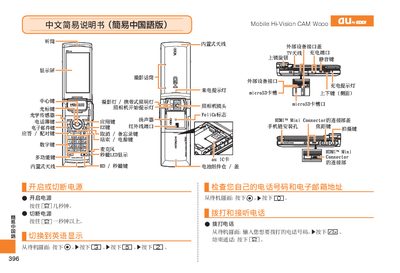
This manual provides step‑by‑step instructions for using the au Mobile Hi‑Vision CAM Wooo. It explains how to answer calls, manage contacts, and operate the camera’s video, animation and snapshot functions.
Additional sections cover muting, voice memo recording, and basic troubleshooting. Contact information for au customer service is included for further assistance. This manual is written in Chinese.
| HDMI Interface | Mini HDMI connector |
|---|
When the phone rings, press the [Csz] button to answer.
From the standby screen, press the [画] button, then press the green [拍摄] button to start recording and the red [停止] button to stop.
From the standby screen, hold the mute button for more than one second to enable mute; repeat the same action to cancel mute.