
This document introduces the peripherals and usage of the T001 mobile phone, including battery pack, desktop holder, external interface adapter, earphones, bone conduction receiver microphone, and universal DC adapter. It also explains how to replace the battery pack and charge using the universal DC adapter.
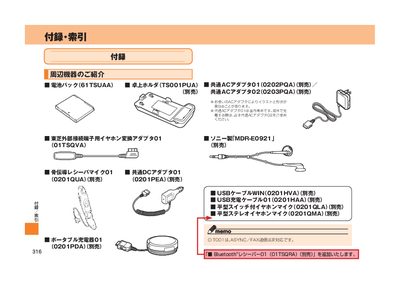
This manual provides step‑by‑step instructions for handling the au T001 handset. It covers battery‑pack removal and installation, charging procedures, and the use of optional accessories such as AC adapters, earphone adapters, and Bluetooth receivers.
Additional sections describe troubleshooting tips, service‑area checks, and the details of the optional “Full‑Change” part‑exchange program, as well as warranty and after‑service information for the device. This manual is written in Japanese.
| Battery pack model | 61TSUAA |
|---|
Full‑Change lets you replace the entire handset with a new set of parts at an au shop; the new parts are installed for a fee and the phone’s appearance and design can be updated.