
This is a Chinese mobile phone manual, which mainly introduces the power on and off, language switching, dialing and answering calls, saving and viewing phone book names, using the camera (animation and snapshots), dialing international long distance calls, etc.
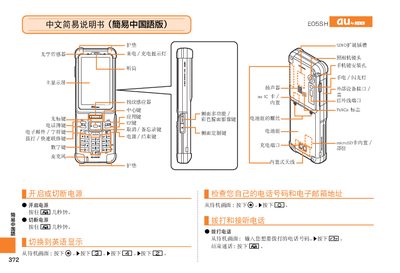
The guide explains how to make and receive calls, adjust call volume, and manage contacts on the E05SH phone. It also covers basic camera functions, including taking photos, recording animations, and switching between photo and animation modes.
Additional sections describe how to mute the device, record voice memos, and dial international numbers such as calls to the United States. Contact information for au customer service is provided at the end of the manual. This manual is written in Chinese.
| Felica NFC | present |
|---|
When the phone rings, press the designated button to answer the call.
During shooting, press the [回] button to toggle between photo and animation modes.
From the standby screen, hold the mute button for more than one second to enable mute mode.
Dial the country code followed by the number, for example 212‑123‑... for a US long‑distance call.