
This is an instruction manual for a mobile phone. It contains instructions on how to turn on, turn off, switch languages, make and receive calls, save and view phonebook entries, use the camera to take animation and snapshots, and make international long-distance calls.
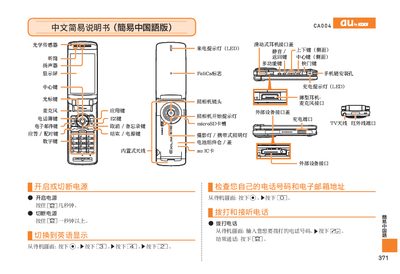
This manual provides step‑by‑step instructions for operating the au CA004 mobile phone. It explains how to power the device on and off, make and receive calls, manage contact lists, and use the built‑in camera for photos and video.
Additional sections cover setting the phone to silent mode, recording voice memos, and using auxiliary functions such as the infrared port and SD‑card slot. The guide is written in simple Chinese for easy reference. This manual is written in Chinese.
| Felica Support | Yes |
|---|
From the standby screen, enter the phone number you want to call and press the call key.
When the phone rings, press the answer key to answer the call.
From the standby screen, hold the silent‑mode key for more than one second.
From the standby screen, hold the voice‑memo key for more than one second to start recording.