
This is a mobile phone user manual, which introduces how to turn on, turn off, make calls, receive calls, save and view phone book lists, use the camera to shoot animations and snapshots, make international long-distance calls, etc.
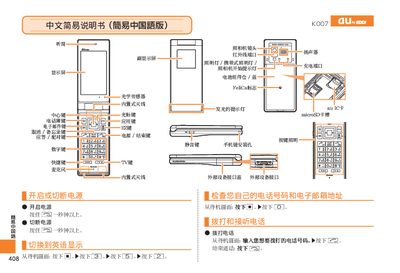
This manual provides simple step‑by‑step instructions for operating the au by KDDI K007 phone in Chinese. It explains how to make and receive calls, manage contacts, adjust volume, and use the built‑in camera and voice memo features.
The guide also includes instructions for switching between video and photo modes, recording and saving media, setting mute mode, and dialing international numbers. Contact information for au customer service is provided at the end. This manual is written in Chinese.
| FeliCa support | Yes |
|---|---|
| microSD card slot | Present |
| Optical sensor | Built‑in |
When the phone rings, press the [Answer] button to answer the call.
Press the [Record] button to start recording, press it again to stop, then press [Save] to store the video.
While in video mode, press the [Switch] button to change to photo mode, and vice versa.
From the standby screen, hold the mute button for about one second; repeat to cancel mute.