
au by KDDI H001 Mobile Phone Easy Manual


au by KDDI H001 Mobile Phone Easy Manual - cover page
Brand
au by KDDI
Category
Cell Phones
Document type
User Manual
Language
Chinese
Pages
2
File format
PDF
Published
17 December, 2011
Updated
29 September, 2023
MD5 checksum
8E36E89DB192F19B998DCCB4B5C60C57

About this manual

This Chinese easy manual for the au by KDDI H001 mobile phone describes basic operations using the phone's keys and on-screen menus, including power on/off, calling, answering calls, and saving or viewing contacts.

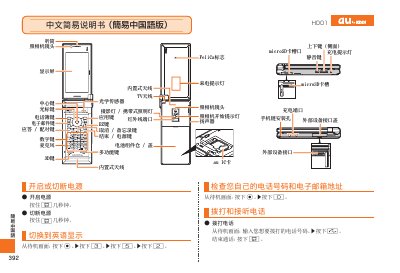
The guide also explains how to record video and take snapshots, set silent mode, and set a voice memo. It identifies phone parts such as the camera lens, display, internal antenna, microphone, battery compartment, microSD card slot, charging port, and external device connector. This manual is written in Chinese.

What's inside

  • Turning the power on and off
  • Making calls
  • Answering calls
  • Saving contacts
  • Viewing contacts
  • Shooting video
  • Taking snapshots
  • Setting silent mode
  • Setting voice memo
  • International calls

Frequently asked questions

How do I make a call on the au by KDDI H001?

From the standby screen, enter the phone number you want to call and press the call key.

How do I answer an incoming call?

When the phone rings, press the answer key.

How do I take a snapshot?

Open the camera, select Photo, then press the shutter key to take the picture and save it.

Download PDF

More au by KDDI Manuals


View all au by KDDI manuals →