
The AU K004 mobile phone user manual provides operating instructions, button functions, and basic settings in Chinese.
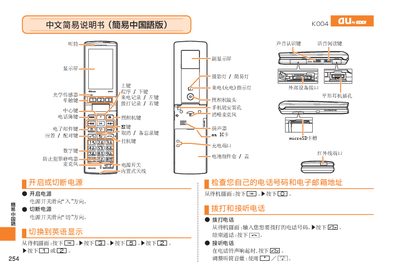
This manual describes the hardware components and key buttons of the AU K004 mobile phone, including how to navigate the standby screen and access various functions. It explains the operation of volume control, mute mode, and the process for making calls.
The guide also covers media functions such as switching to photo mode, capturing snapshots, saving photos, and changing to video mode. Additional instructions are provided for adjusting settings and using the device's basic features. This manual is written in Chinese.
Press the snapshot button to change to photo mode.
Press the mute button again to exit mute mode.
In photo mode, press the video button to switch to video mode.