
This document is a simplified Chinese manual for the 414 mobile phone. It introduces the various components and functions of the phone, such as optical sensors, earpieces, displays, center keys, cursor keys, etc. It also explains how to operate the phone, such as making and receiving calls, saving and viewing phonebook entries, using the camera, etc. In addition, the document provides instructions for other phone features, such as setting the silent mode, voice memo, etc. For inquiries, please contact the au customer service center.
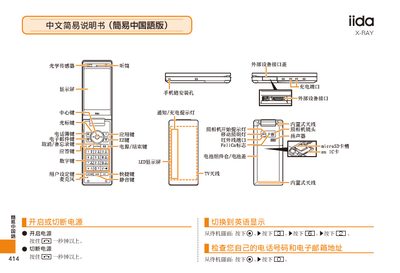
This manual provides step‑by‑step instructions for operating the au iida X‑ray device. It explains how to turn the device on and off, make and receive phone calls, adjust the handset volume, and manage contacts.
Additional sections describe how to capture photos and record animations, switch between photo and video modes, set silent mode, record voice memos, and contact au customer service for support. This manual is written in Chinese.
From the standby screen, press and hold the power button for more than one second.
In photo mode press the designated button to switch to animation mode, and press the same button again to return to photo mode.