
This document introduces a Chinese simplified instruction manual, including explanations of various parts and functions of the phone, as well as instructions on how to use and operate it.
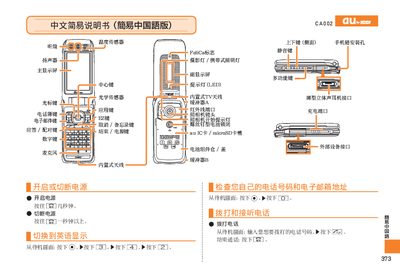
This manual provides step‑by‑step instructions for using the au CA002 phone. It explains how to power the device on and off, make and receive calls, manage contacts, and operate the built‑in camera for both photos and animations.
Additional sections cover silent mode, voice memo recording, international dialing, and contact information for au customer service. The guide is written in simplified Chinese and is intended for everyday users of the CA002 handset. This manual is written in Chinese.
| Display | Main screen and secondary screen |
|---|---|
| FeliCa support | Yes |
Press and hold the power button (SB) for a few seconds.
From the standby screen, enter the phone number and press the call key (sz).
Press and hold the mute key for more than one second; repeat to cancel.