
This is a mobile phone manual that introduces how to use the mobile phone's power on, power off, make phone calls, answer phone calls, save contacts, view contacts, take pictures, and record videos.
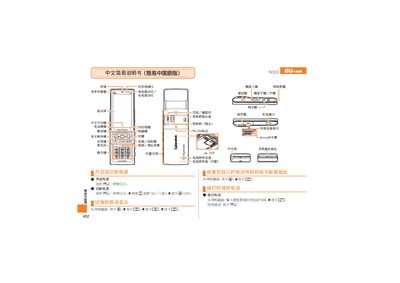
The manual introduces the main hardware of the au S003, including the infrared port, charging port, display screen, built‑in antenna, micro‑SD card slot and various function keys such as the answer key, camera key and shortcut keys.\n\nIt provides step‑by‑step instructions for common tasks: making and receiving calls, saving contacts, taking photos, recording animations, setting mute mode, and using the voice memo feature. Contact information for au customer service is also listed. This manual is written in Chinese.
| Micro‑SD card slot | Present |
|---|
Press the answer key (应答键) on the device.
From the standby screen, press and hold the mute key for more than one second.
From the standby screen, hold the back key for more than one second, then follow the prompts to edit and save the contact.