
Zebra ZD888T Printer Quick Start Guide

This quick start guide provides instructions for installing drivers, setting up the Zebra ZD888T printer, loading media and ribbons, and performing a test…
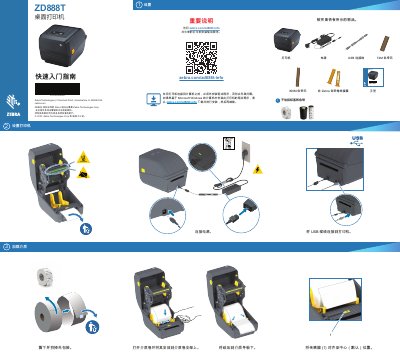

Zebra ZD888T Printer Quick Start Guide - cover page
Brand
Zebra
Category
Printer
Document type
Quick Start Guide
Language
Chinese
Pages
2
File format
PDF
File size
1.6 MB
Published
22 October, 2026
Updated
22 October, 2026
Model
ZD888T
MD5 checksum
EC110AF9825FC483439D9E5BB83C15BD

About this manual

This document serves as a quick start guide for the Zebra ZD888T printer. It outlines the necessary steps to prepare the device for use, including installing the required drivers on a computer before connecting the USB cable and power. The guide also details the process for loading media and the ribbon cartridge. This manual is written in Chinese.

What's inside

  • Important Notice
  • Setting Up the Printer
  • Loading Media
  • Loading Ribbon
  • Power On and Print
  • Test Print
  • Support and Information

Frequently asked questions

What must be done before connecting the printer to a computer?

You must install the printer drivers before connecting the printer to a computer.

How do you load a paper roll onto the printer?

Open the media roll and place it onto the media roll holder.

What action starts the printer power-on sequence?

Press and release the POWER button to begin the power-on process.

Download PDF (1.6 MB)

More Zebra Manuals


View all Zebra manuals →