
Key facts
- Brand
- Mercury
- Model
- MIAP300
- Category
- Other Electronics
- Industry
- Computers
- Documents
- 2
- Languages
- ZH
- Last added
- 2026-10-21
Start here
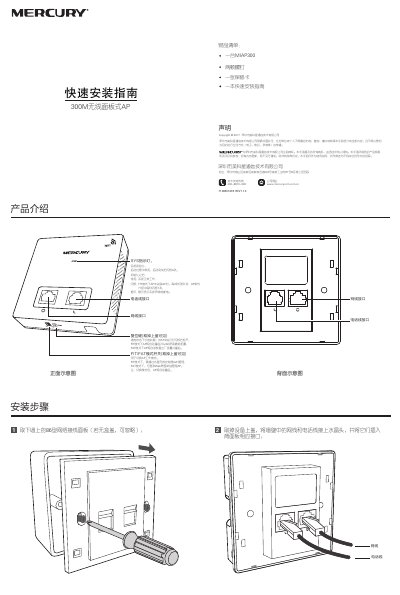
Mercury MIAP300 Wireless Panel AP Quick Installation Guide
This document is a quick installation guide for the Mercury MIAP300 wireless panel access point (AP). It provides instructions for physical installation, including connecting network and telephone cables to the back panel and securing the unit to a wall box. The guide also details how to switch between FIT and FAT operating modes using a physical switch on the device. This manual is written in Chinese.
Read onlineMercury MIAP300 specifications
| Mounting Type | Wall-mounted 86-type network jack panel |
|---|---|
| Reset Functionality | Press button >1s to restart, >5s for factory reset |
| Management Modes | FIT mode managed by AC; FAT mode standalone Web management |
All Mercury MIAP300 documents by type
The shortest path to a working setup, usually only a few pages.
Day-to-day operation, settings and troubleshooting. Start here if the product is already set up.
Questions answered in these manuals
What is the default IP address for the Mercury MIAP300 when in FAT mode?
The default IP address for the device is 192.168.1.254.
From: Mercury MIAP300 Wireless Panel AP Quick Installation Guide
How does the SYS indicator light behave when the AP is initializing?
During initialization, the light stays on while starting and then flashes four times after completion.
From: Mercury MIAP300 Wireless Panel AP Quick Installation Guide
How do I perform a factory reset on the AP?
Press and hold the button for more than 5 seconds to restore factory settings.
What does it mean if the indicator light is blinking every 2 seconds?
It indicates that in FIT mode, the AP has not associated with an AC controller.