
Key facts
Start here
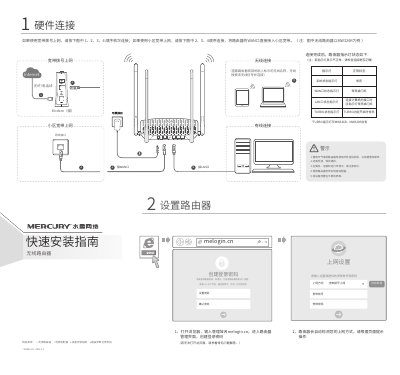
Mercury MW326R Router Quick Start Guide
The guide explains how to connect the router hardware safely, including power, WAN/LAN ports, and environmental warnings such as avoiding lightning and heat sources. It also shows the indicator LED status after connection.
It then walks through creating a login password, configuring broadband or ISP settings, setting the wireless SSID and password, and includes a FAQ section for common issues like accessing the management page or resetting the device. This manual is written in Chinese.
All MERCURY MW326R documents by type
Day-to-day operation, settings and troubleshooting. Start here if the product is already set up.
The shortest path to a working setup, usually only a few pages.
Questions answered in these manuals
How do I restore the router to factory settings?
Hold the RESET button on the back panel until all indicator lights turn on simultaneously, then release it.
From: MERCURY MW326R Wireless Router Quick Installation Guide
What is the warranty period for the power adapter?
The warranty period for the power adapter is 1 year.
From: MERCURY MW326R Wireless Router Quick Installation Guide
How do I reset the router to factory settings?
Power on the router, press and hold the RESET button on the back panel until all LEDs light up, then release.
What should I do if I cannot open the router's management interface (melogin.cn)?
Ensure the computer obtains an IP automatically, connect to the router's LAN port, check LED status, disable proxy settings, try a different browser or cable, and reset the router if needed.