
Key facts
Start here
Lenovo SureFibre400 RAID Management Software User Manual
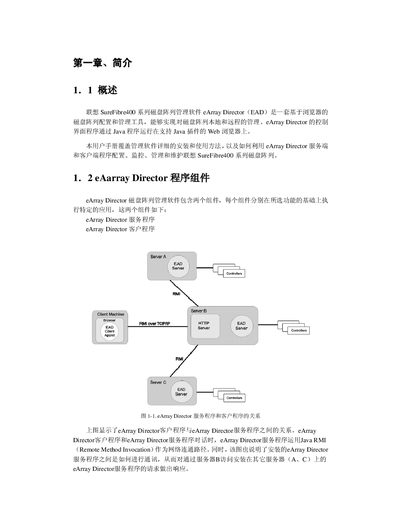
This manual describes the eArray Director management software for the Lenovo SureFibre400 RAID storage series. It explains the two software components (service and client), their interaction via Java RMI, and the supported hardware and network environments.
The guide provides step‑by‑step installation instructions for Windows, Linux and Solaris, details configuration wizards, monitoring and maintenance functions, and lists compatible operating systems, browsers, HBAs and controller configurations. This manual is written in Chinese.
Lenovo FIBRE400 specifications
| Minimum CPU | 500 MHz Pentium II or higher |
|---|---|
| Minimum RAM | 256 MB |
| Minimum Disk Space | 200 MB |
| Network Interface | 100Base‑T or better |
| Display Resolution | 800 × 600 minimum |
| Color Depth | 65 535 colors minimum |
| Supported Operating Systems | Windows NT 4.0+, Windows 2000 SR2+, Windows XP, Red Hat Linux 7.1/7.2, Solaris 8 |
| Supported Browsers | Internet Explorer 5.0+, Netscape Navigator 4.5+ |
| Supported HBAs | QLogic QLA 2200F/2310F/2342F, Emulex LP/9000/9000F/9002F |
| Controller Types | Simplex and Dual‑active |
Source: Lenovo SureFibre400 RAID Management Software User Manual
All Lenovo FIBRE400 documents by type
Day-to-day operation, settings and troubleshooting. Start here if the product is already set up.
Disassembly, diagnostics and part numbers, for repair.
Mounting, wiring and first power-up. Read it before the hardware goes in.
Questions answered in these manuals
What are the hardware requirements for installing eArray Director?
A PC with at least a 500 MHz Pentium II processor, 256 MB RAM, 200 MB free disk space, a 100Base‑T network interface, 800 × 600 display resolution and 65 535 colors is required.
From: Lenovo SureFibre400 RAID Management Software User Manual
Which operating systems are supported by the eArray Director software?
The software runs on Windows NT 4.0 or later, Windows 2000 SR2 or later, Windows XP, Red Hat Linux 7.1/7.2 (kernel 2.4) and Solaris 8.
From: Lenovo SureFibre400 RAID Management Software User Manual
Which HBA adapters are supported by the SureFibre400 array?
The array supports Qlogic Qla2310F, Qla2340L, Qla2342L, Emulex LP9002L/9802L/982L, and LSIlogic FC40909G/FC40919O adapters.
How should the disk array ID be set to avoid conflicts?
Each array must have a unique ID between 0 and 7, and both controller cards in the same array must share the same ID.
What is the purpose of this manual?
It provides Lenovo storage engineers with detailed knowledge for using, maintaining, and upgrading the SureFi bre400 RAID system.
How are failed disk modules replaced?
The manual describes step‑by‑step procedures under the “更换磁盘模块” section, including replacing online disks, failed disks, and multiple disks.