
eArray Director is a browser-based disk array configuration and management tool that can manage disk arrays locally and remotely. eArray Director's control interface program runs through Java programs on web browsers that support Java plugins. This user manual covers detailed installation and use methods of management software, as well as how to use eArray Director server and client programs to configure, monitor, manage and maintain Lenovo SureFibre400 series disk arrays.
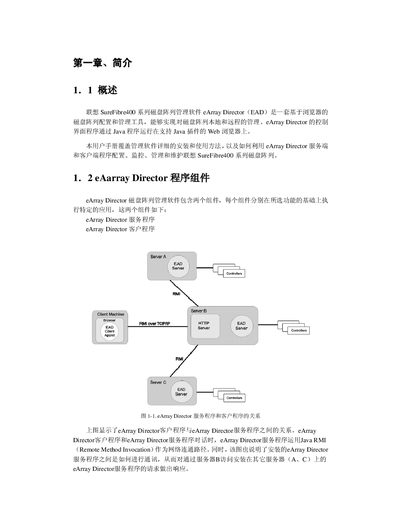
This manual describes the eArray Director management software for the Lenovo SureFibre400 RAID storage series. It explains the two software components (service and client), their interaction via Java RMI, and the supported hardware and network environments.
The guide provides step‑by‑step installation instructions for Windows, Linux and Solaris, details configuration wizards, monitoring and maintenance functions, and lists compatible operating systems, browsers, HBAs and controller configurations. This manual is written in Chinese.
| Minimum CPU | 500 MHz Pentium II or higher |
|---|---|
| Minimum RAM | 256 MB |
| Minimum Disk Space | 200 MB |
| Network Interface | 100Base‑T or better |
| Display Resolution | 800 × 600 minimum |
| Color Depth | 65 535 colors minimum |
| Supported Operating Systems | Windows NT 4.0+, Windows 2000 SR2+, Windows XP, Red Hat Linux 7.1/7.2, Solaris 8 |
| Supported Browsers | Internet Explorer 5.0+, Netscape Navigator 4.5+ |
| Supported HBAs | QLogic QLA 2200F/2310F/2342F, Emulex LP/9000/9000F/9002F |
| Controller Types | Simplex and Dual‑active |
A PC with at least a 500 MHz Pentium II processor, 256 MB RAM, 200 MB free disk space, a 100Base‑T network interface, 800 × 600 display resolution and 65 535 colors is required.
The software runs on Windows NT 4.0 or later, Windows 2000 SR2 or later, Windows XP, Red Hat Linux 7.1/7.2 (kernel 2.4) and Solaris 8.
Internet Explorer 5.0 or newer and Netscape Navigator 4.5 or newer, both with Java and JavaScript support, are required.
Compatible HBAs include QLogic QLA 2200F/2310F/2342F and Emulex LP/9000/9000F/9002F.