
Key facts
- Brand
- IBM
- Model
- Tivoli Monitoring 6.3.0
- Category
- Other software
- Documents
- 2
- Languages
- EN
- Last added
- 2023-12-01
Start here
IBM Tivoli Monitoring 6.3.0 Quick Start Guide
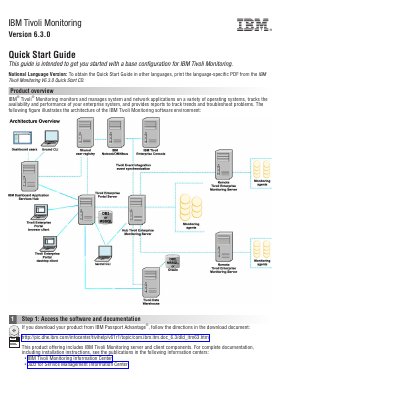
This IBM Tivoli Monitoring Version 6.3.0 Quick Start Guide is intended to get you started with a base configuration of IBM Tivoli Monitoring. It opens with a product overview describing how Tivoli Monitoring monitors and manages system and network applications on a variety of operating systems, tracks availability and performance, and provides reports to track trends and troubleshoot problems.
The guide then walks through six steps: accessing the software and documentation, reviewing the product architecture, installing prerequisite software, installing IBM Tivoli Monitoring with the Startup Center, expanding the environment, and configuring the product. It points to the IBM Tivoli Monitoring Installation and Setup Guide, the Administrator's Guide, and the Tivoli Enterprise Portal User's Guide for further details.
IBM Tivoli Monitoring 6.3.0 specifications
| Product version | 6.3.0 |
|---|---|
| Base architecture components | Tivoli Enterprise Portal Client plus three server components: Tivoli Data Warehouse, Tivoli Enterprise Portal Server, and Tivoli Enterprise Monitoring Server |
| Monitoring agents | OS agents such as AIX, Linux, UNIX, and Windows, plus warehousing agents that collect, summarize, and prune historical data |
| Startup Center installation platforms | Windows or Linux |
All IBM Tivoli Monitoring 6.3.0 documents by type
The shortest path to a working setup, usually only a few pages.
Questions answered in these manuals
What does IBM Tivoli Monitoring do?
It monitors and manages system and network applications on a variety of operating systems, tracks the availability and performance of your enterprise system, and provides reports to track trends and troubleshoot problems.
How do I install IBM Tivoli Monitoring?
Use the Startup Center, which performs a basic installation into either a local or a distributed environment configuration.
What does IBM Tivoli Monitoring do?
It monitors and manages system and network applications on a variety of operating systems, tracks the availability and performance of your enterprise system, and provides reports to track trends and troubleshoot problems.
From: IBM Tivoli Monitoring 6.3.0 Fix Pack 2 Quick Start Guide
How do I perform a basic IBM Tivoli Monitoring installation?
Insert the appropriate IBM Tivoli Monitoring Startup Center CD into the CD-ROM drive of your Windows or Linux system, or access the product from Passport Advantage.
From: IBM Tivoli Monitoring 6.3.0 Fix Pack 2 Quick Start Guide