
IBM Tivoli Monitoring monitors and manages system and network applications on a variety of operating systems, tracks the availability and performance of your enterprise system, and provides reports to track trends and troubleshoot problems.
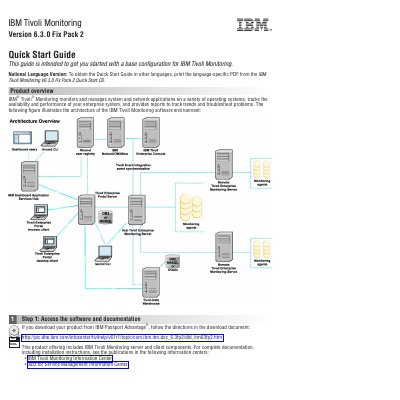
This quick start guide is intended to get you started with a base configuration for IBM Tivoli Monitoring Version 6.3.0 Fix Pack 2. It describes what the product does, how the software environment is architected, and then walks through six steps: accessing the software and documentation, reviewing the product architecture, installing prerequisite software, installing IBM Tivoli Monitoring, expanding the environment, and configuring it.
The base architecture consists of the Tivoli Enterprise Portal Client plus three server components (Tivoli Data Warehouse, Tivoli Enterprise Portal Server, and Tivoli Enterprise Monitoring Server), together with monitoring agents such as the AIX, Linux, UNIX, and Windows OS agents and warehousing agents. The guide also notes how the environment can be extended to integrate with an event server and with Jazz for Service Management components, and points to the Installation and Setup Guide, the Administrator's Guide, and the Tivoli Enterprise Portal User's Guide for further configuration details.
| Base architecture components | Tivoli Enterprise Portal Client plus three server components: Tivoli Data Warehouse, Tivoli Enterprise Portal Server, and Tivoli Enterprise Monitoring Server |
|---|---|
| Monitoring agents | OS agents for AIX, Linux, UNIX, and Windows, plus warehousing agents |
| Installation method | Startup Center, into a local or distributed environment configuration |
| Event server integration | IBM Tivoli Netcool/OMNIbus or Tivoli Enterprise Console |
It monitors and manages system and network applications on a variety of operating systems, tracks the availability and performance of your enterprise system, and provides reports to track trends and troubleshoot problems.
Insert the appropriate IBM Tivoli Monitoring Startup Center CD into the CD-ROM drive of your Windows or Linux system, or access the product from Passport Advantage.
The base architecture includes a group of monitoring agents, including OS agents such as AIX, Linux, UNIX, and Windows, and warehousing agents that collect, summarize, and prune historical data.
The guide refers to the IBM Tivoli Monitoring Installation and Setup Guide, the Administrator's Guide, and the Tivoli Enterprise Portal User's Guide, as well as the IBM Tivoli Monitoring Information Center.