
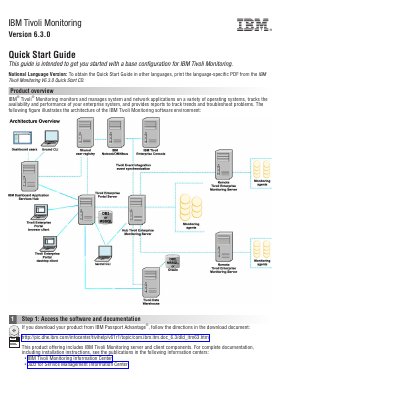
IBM Tivoli Monitoring monitors and manages system and network applications on a variety of operating systems, tracks the availability and performance of your enterprise system, and provides reports to track trends and troubleshoot problems.
This IBM Tivoli Monitoring Version 6.3.0 Quick Start Guide is intended to get you started with a base configuration of IBM Tivoli Monitoring. It opens with a product overview describing how Tivoli Monitoring monitors and manages system and network applications on a variety of operating systems, tracks availability and performance, and provides reports to track trends and troubleshoot problems.
The guide then walks through six steps: accessing the software and documentation, reviewing the product architecture, installing prerequisite software, installing IBM Tivoli Monitoring with the Startup Center, expanding the environment, and configuring the product. It points to the IBM Tivoli Monitoring Installation and Setup Guide, the Administrator's Guide, and the Tivoli Enterprise Portal User's Guide for further details.
| Product version | 6.3.0 |
|---|---|
| Base architecture components | Tivoli Enterprise Portal Client plus three server components: Tivoli Data Warehouse, Tivoli Enterprise Portal Server, and Tivoli Enterprise Monitoring Server |
| Monitoring agents | OS agents such as AIX, Linux, UNIX, and Windows, plus warehousing agents that collect, summarize, and prune historical data |
| Startup Center installation platforms | Windows or Linux |
It monitors and manages system and network applications on a variety of operating systems, tracks the availability and performance of your enterprise system, and provides reports to track trends and troubleshoot problems.
Use the Startup Center, which performs a basic installation into either a local or a distributed environment configuration.
Along with the Tivoli Enterprise Portal Client, the three server components are the Tivoli Data Warehouse, the Tivoli Enterprise Portal Server, and the Tivoli Enterprise Monitoring Server.
The guide refers to the Installation and Setup Guide, the Administrator's Guide, and the Tivoli Enterprise Portal User's Guide.