
Installation guide for the Thermaltake Water 3.0 360 ARGB Sync AIO liquid cooler, covering Intel and AMD mounting and ARGB controller light modes.
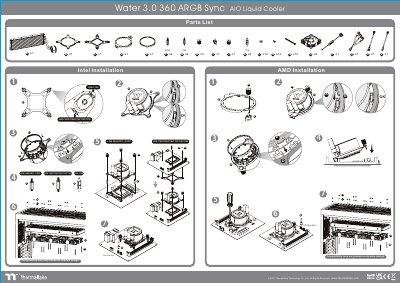
The Thermaltake Water 3.0 360 ARGB Sync installation guide shows the parts list and mounting paths for Intel and AMD systems. It lists Intel sockets LGA 1700/1200/1156/1155/1151/1150 and LGA 2066/2011-3/2011, and notes that compatibility may vary based on chassis design.
The guide also covers the ARGB controller and mainboard sync connection. It describes 7 LED modes, color and light-speed controls, and the cable connection from the mainboard signal bridge cable to the fan LED cable. This manual is written in Chinese.
| Product part number | CL-W234-PL12SW-A |
|---|---|
| Intel CPU socket support | LGA 1700/1200/1156/1155/1151/1150 and LGA 2066/2011-3/2011 |
| LED light modes | 7 LED modes |
| LED color options | 8 LED colors in Full Lighted, Pulse and Blink modes |
| Light speed settings | Slow, Normal, Fast, Extreme |
The guide lists LGA 1700/1200/1156/1155/1151/1150 and LGA 2066/2011-3/2011 for Intel installation.
The controller switches between 7 LED modes.
Power off the PC and check the positive and negative ends on the connector before connecting the cable to the mainboard.
Connect the Mainboard Signal Bridge Cable to the fan LED cable.