
Thermaltake Riing Trio 12 RGB Radiator Fan TT Premium Edition 3 Pack User Manual

This manual provides installation instructions and usage guide for the Thermaltake Riing Trio 12 RGB Radiator Fan, including controller setup and software…
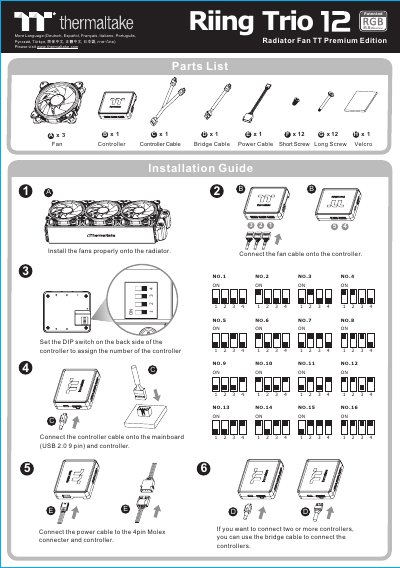

Thermaltake Riing Trio 12 RGB Radiator Fan TT Premium Edition 3 Pack User Manual - cover page
Brand
Thermaltake
Document type
User Manual
Language
Chinese
Pages
2
File format
PDF
File size
1.2 MB
Published
12 October, 2026
Updated
12 October, 2026
MD5 checksum
8FDC04C9455562457711F1DD68E00038

About this manual

The document serves as an installation and user guide for the Thermaltake Riing Trio 12 RGB Radiator Fan TT Premium Edition 3 Pack. It details how to install fans onto a radiator, connect fan cables to a controller using DIP switches, and link the controller to the mainboard via USB. This manual is written in Chinese.

What's inside

  • Parts List
  • Installation Guide
  • DIP Switch Settings
  • TT RGB Plus Software
  • Fan Speed Mode
  • LED Lighting Mode

Frequently asked questions

What is the maximum fan speed in Performance Mode?

In Performance Mode, the fan speed ranges from 500 to 1500 RPM.

What is the maximum fan speed in Silent Mode?

In Silent Mode, the fan speed ranges from 500 to 900 RPM.

Which operating systems are compatible with the TT RGB Plus software?

The software is compatible with Windows 7, 8, 8.1, and 10.

Download PDF (1.2 MB)

More Thermaltake Manuals


View all Thermaltake manuals →