
Installation and usage guide for Thermaltake's 3-pack RGB case fans with controller and software setup instructions.
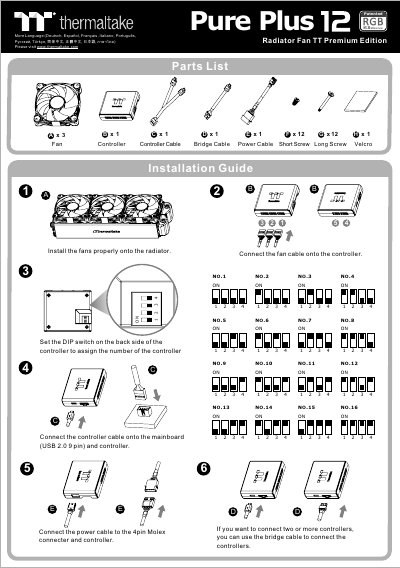
This manual provides step-by-step instructions for installing the Thermaltake Pure Plus RGB 12 Case Fan 3 Pack, connecting fans to the controller, setting DIP switches, and using the TT RGB Plus software. It also covers fan speed modes, LED lighting options, and mobile app connectivity. The fans feature 16.8 million color support and are compatible with Windows 7/8/8.1/10. This manual is written in Chinese.
| Fan Size | 148 mm |
|---|---|
| LED Color Options | 16.8 Million Colors |
| Fan Speed Modes | Performance, Silent, PWM |
| Software Compatibility | Windows 7/8/8.1/10 |
Yes, connect the PC to your wireless network and set a password in the software to allow the TT RGB Plus app to connect.
The maximum fan speed in Performance Mode is 1500 RPM.
The maximum fan speed in Silent Mode is 900 RPM.
The software is compatible with Windows 7, 8, 8.1, and 10.