
Compatibility guide listing external and internal drives compatible with Roland VS-series digital studio workstations, including capacity limits and…
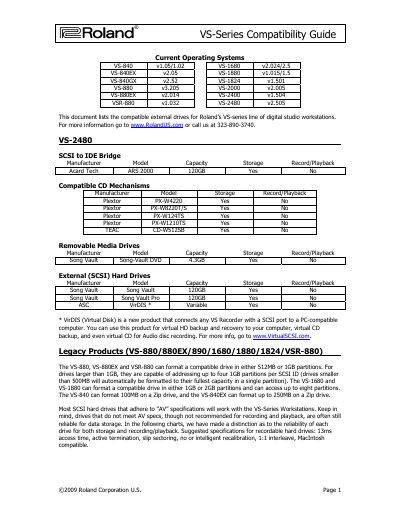
Roland VS-Series Compatibility Guide lists compatible external and internal storage devices for Roland VS-series digital studio workstations. It covers SCSI-to-IDE bridges, CD mechanisms, removable media, magneto-optical drives, and internal and external hard drives.
The guide also gives workstation-specific hard drive interface and capacity limits, partition information for legacy models, suggested recordable hard drive specifications, and a warning against parallel port disk drives.
| VS-2480/VS-2400/VS-2000 internal HDD interface | 3.5 inch IDE (Parallel ATA) |
|---|---|
| VS-2480/VS-2400/VS-2000 maximum internal HDD capacity | No larger than 120GB |
| VS-1680/VS-1880/VS-1824 internal HDD interface | 2.5 inch IDE (Parallel ATA) notebook drive |
| VS-1680/VS-1880/VS-1824 maximum internal HDD capacity | No larger than 16GB |
| VSR-880/VS-890 maximum internal HDD capacity | No larger than 10GB |
| VS-880/VS-880EX maximum internal HDD capacity | No larger than 6GB (4GB will be formatted) |
| VS-880/VS-880EX/VSR-880 maximum partitions | Up to four 1GB partitions per SCSI ID |
| VS-1680/VS-1880 maximum partitions | Up to eight partitions |
| Suggested recordable hard drive access time | 13ms |
The maximum internal hard drive size is no larger than 120GB.
No, parallel port disk drives are not compatible and could damage one or both devices.
Roland recommends avoiding Western Digital brand hard drives because they can pose compatibility issues.
The VS-1680 and VS-1880 can access up to eight partitions.