
This guide provides troubleshooting procedures for Rockwell Automation Kinetix 6000 IAM/AM modules, covering status indicators, error codes, and resolutions.
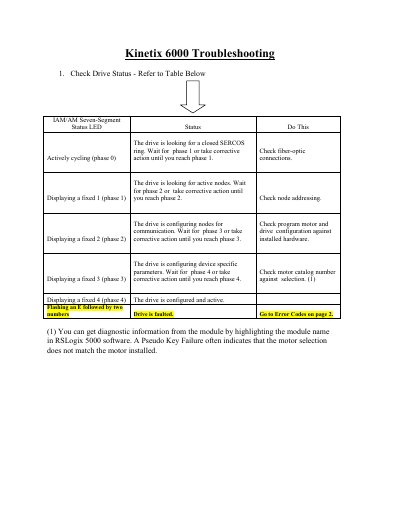
This document serves as a troubleshooting reference for the Rockwell Automation Kinetix 6000 IAM/AM modules. It details how to interpret the seven-segment status LED indicators during the drive startup phases, such as checking for closed SERCOS rings or active nodes. The guide also explains how to diagnose faults indicated by an 'E' followed by a two-digit error code.
| DC Bus Overvoltage Limit (460V system) | Over 820V |
|---|---|
| DC Bus Overvoltage Limit (230V system) | Over 410V |
It indicates that the drive is faulted and the two-digit error code is being displayed.
The drive is looking for active nodes; wait for phase 2 or take corrective action such as checking node addressing.