
MSI E350IA-E45/E350IA-E44/E350IS-E45 Series Mini-ITX Mainboard User Manual

This user manual provides installation, BIOS setup, and connector details for the MSI E350 series Mini-ITX mainboards based on AMD Hudson M1 chipset.

MSI E350IA-E45/E350IA-E44/E350IS-E45 Series Mini-ITX Mainboard User Manual - cover page
Brand
MSI
Category
Motherboard
Document type
User Manual
Language
English
Pages
14
File format
PDF
File size
1010 KB
Published
17 October, 2026
Updated
17 October, 2026
MD5 checksum
B120A799526341147D3D0430F30D2EFD

About this manual

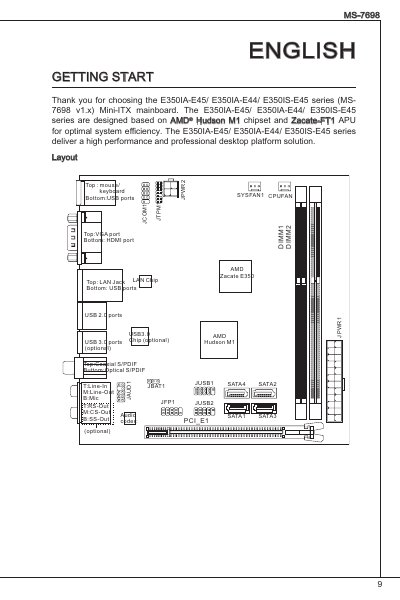
The document covers the MSI E350IA-E45/E350IA-E44/E350IS-E45 Series Mini-ITX Mainboard, designed around the AMD Zacate-F18 APU and Hudson M1 chipset. It serves as a professional desktop platform solution offering high performance.

What's inside

  • Layout
  • Specifications
  • Slots
  • Screw Holes
  • Rear Panel
  • Installing Memory Modules
  • Power Connectors
  • Fan Power Connectors
  • BIOS Setup
  • Clear CMOS Jumper

Specifications

Audio Chipintegrated by Realtek ALC887/ALC892 (optional)
USB 3.0 (for E350IA-E45/E350IA-E44)2 USB 3.0 rear I/O ports

Frequently asked questions

How do I enter the BIOS Setup?

Power on the computer and press the key when the message appears on the screen.

What is the maximum memory capacity for this system?

The mainboard supports up to 8GB of total DDR3 SDRAM using two DIMM slots.

How many USB ports are available on the rear I/O panel?

The back panel includes six USB 2.0 ports and two optional USB 3.0 ports.

Download PDF (1010 KB)

More MSI Manuals


View all MSI manuals →