
Keyence KV Series HMI connection manual covering TCP factory settings and PLC read/write address definitions.
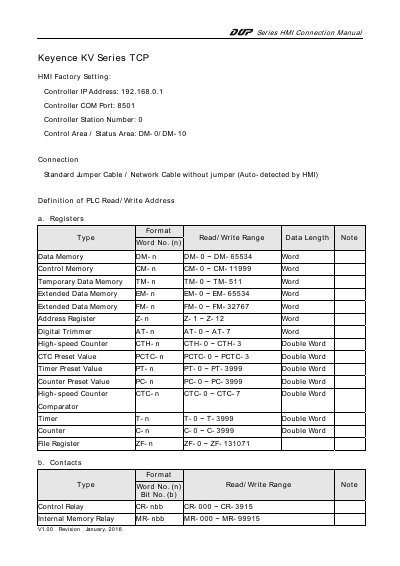
Series HMI Connection Manual V1.00 (Revision January 2016) describes TCP connection settings for a Keyence KV Series controller, including controller IP address 192.168.0.1, COM port 8501, station number 0, and control/status areas DM-0/DM-10. It also lists connection cable guidance and notes that the connection is auto-detected by the HMI.
The document defines PLC read/write addresses for registers and contacts. Register entries include data memory, control memory, temporary data memory, extended data memory, address register, digital trimmer, high-speed counter, timer, counter, and file register ranges, with word or double-word data lengths; contact entries list bit-number formats and ranges.
| Controller IP Address | 192.168.0.1 |
|---|---|
| Controller COM Port | 8501 |
| Controller Station Number | 0 |
| Control Area / Status Area | DM-0/DM-10 |
| Data Memory (DM) Range | DM-0 to DM-65534 |
| File Register (ZF) Range | ZF-0 to ZF-131071 |
| Control Relay (CR) Range | CR-000 to CR-3915 |
The factory setting is 192.168.0.1.
The controller COM port is 8501.
They are set to DM-0/DM-10.
It lists a jumper cable or a network cable without jumper, auto-detected by the HMI.